Connect Your WordPress Forms to Zoho
Send form submissions to Zoho and reduce manual data entry with FormBridge. It's a WordPress Zoho integration plugin with a free version you can set up in minutes.
- 10 form plugins
- 6 Zoho apps in the free version
- No code needed
Works with these forms
- Elementor Pro Forms
- Contact Form 7
- WPForms
- Gravity Forms
- Fluent Forms
- Ninja Forms
- Forminator
- Formidable Forms
- Happy Forms
- SureForms
Sends to these Zoho apps
- Zoho CRM
- Zoho Bigin
- Zoho Books
- Zoho Desk
- Zoho Campaigns
- Zoho Marketing Automation
Everything you need to send form data to Zoho
Pick a form, choose where the data goes in Zoho, and match the fields. FormBridge handles the rest.
Connect your forms
FormBridge finds your saved forms and their fields automatically. There's no shortcode to add and nothing to change on the form.
Works with 10 form plugins. See the form trigger guides.
Map fields your way
Send a form field, a fixed value, or a mix of both to any Zoho field. Required Zoho fields are added for you.
| Source | Zoho field |
|---|---|
| Email field | |
| {first-name} {last-name} | Last Name |
| Static value: Website | Lead Source |
Send submissions to Zoho
Each new submission is sent to Zoho straight away, during the form request. It doesn't wait for a background job.
Create CRM leads, Books invoices, Desk tickets, mailing list contacts and more. See the Zoho app guides.
Built for reliable delivery
- Duplicate handling
Update a matching Zoho record, for example by email, instead of creating a new one.
- Automatic retries
Temporary Zoho or network errors are retried up to three more times.
- Delivery logs
See every success and failure, with a link to the record in Zoho and one-click resubmit.
- Multiple Zoho accounts
Connect several accounts and pick one per feed. All eight Zoho data centres are supported.
- File uploads to CRM
Send uploaded files to Zoho CRM file and image fields, up to 20 MB per file.
- Email alerts
Get an email when a delivery fails or a Zoho connection stops working.
- Privacy by default
Visitor answers are not stored in logs unless you turn it on. Tokens are encrypted.
- Only the access you choose
Zoho asks permission only for the apps you select when you connect.
How it works
Set up your first form-to-Zoho flow in three steps.
-
Connect your Zoho account
Create a client in the Zoho API Console, paste the Client ID and Client Secret into FormBridge, and approve access.
How to create a Zoho connection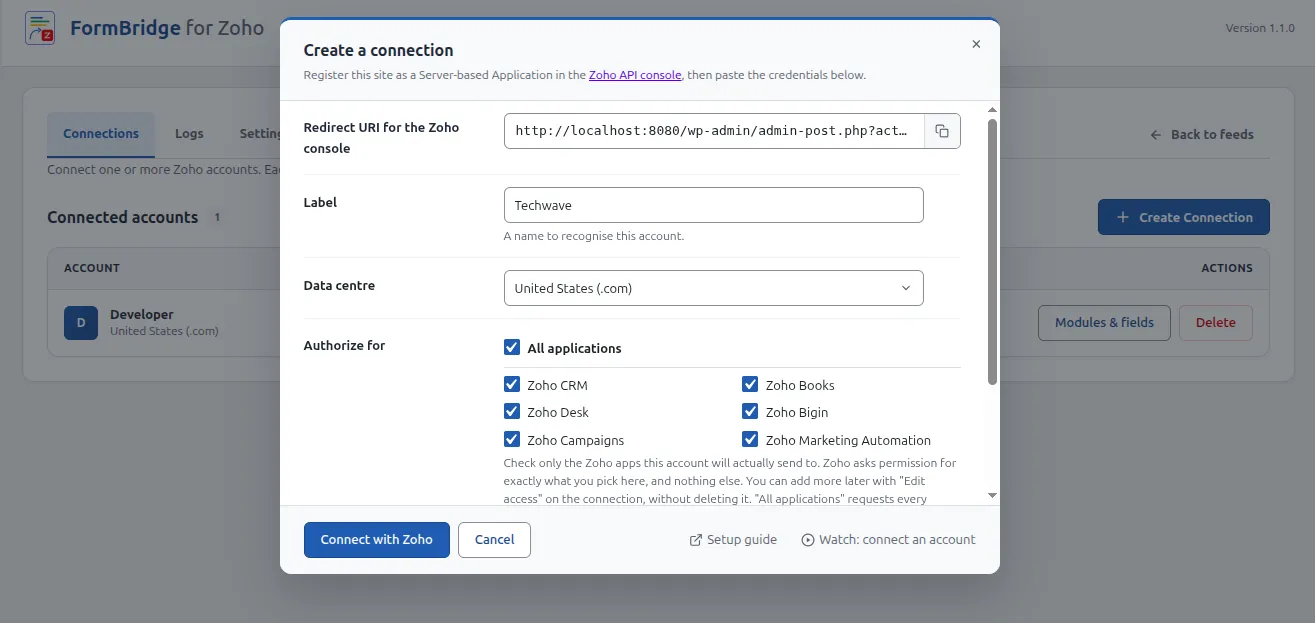
Connections screen with a connected Zoho account -
Select your WordPress form
Add a new feed, choose your form plugin, give the feed a name, and pick the form it should listen to.
Guides for each form plugin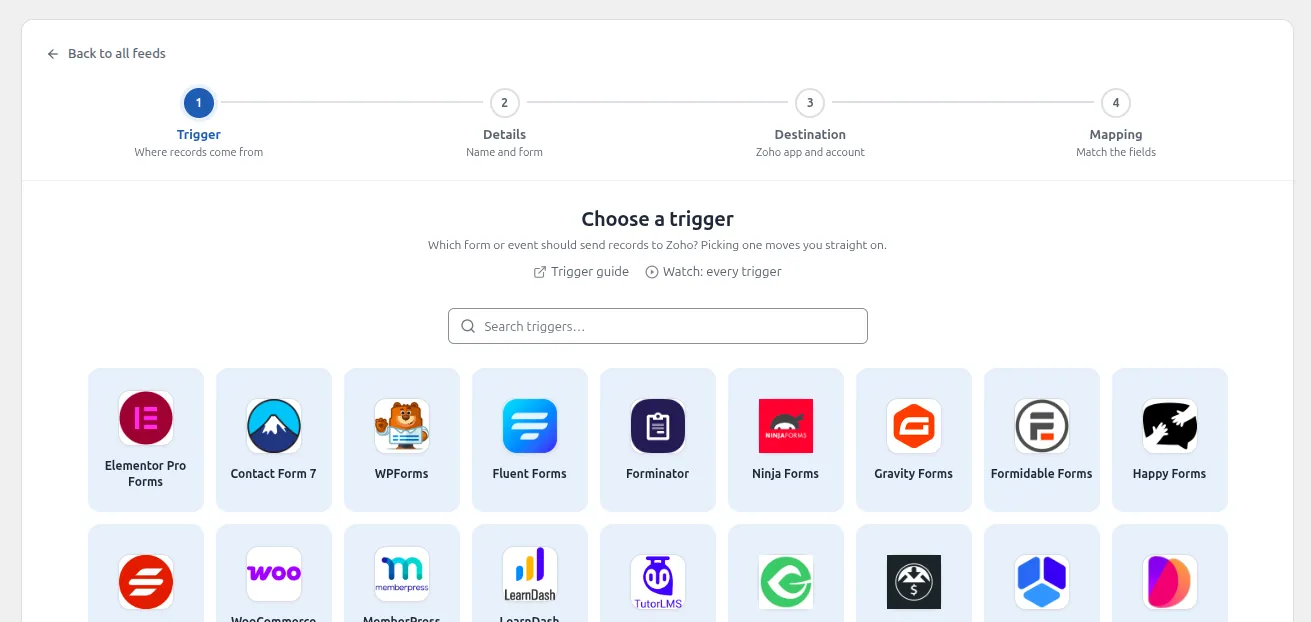
Trigger picker showing the supported form plugins -
Map the fields and activate the flow
Choose the Zoho app and module, match your form fields to Zoho fields, then click Create feed. It starts working right away.
WordPress to Zoho CRM setup guide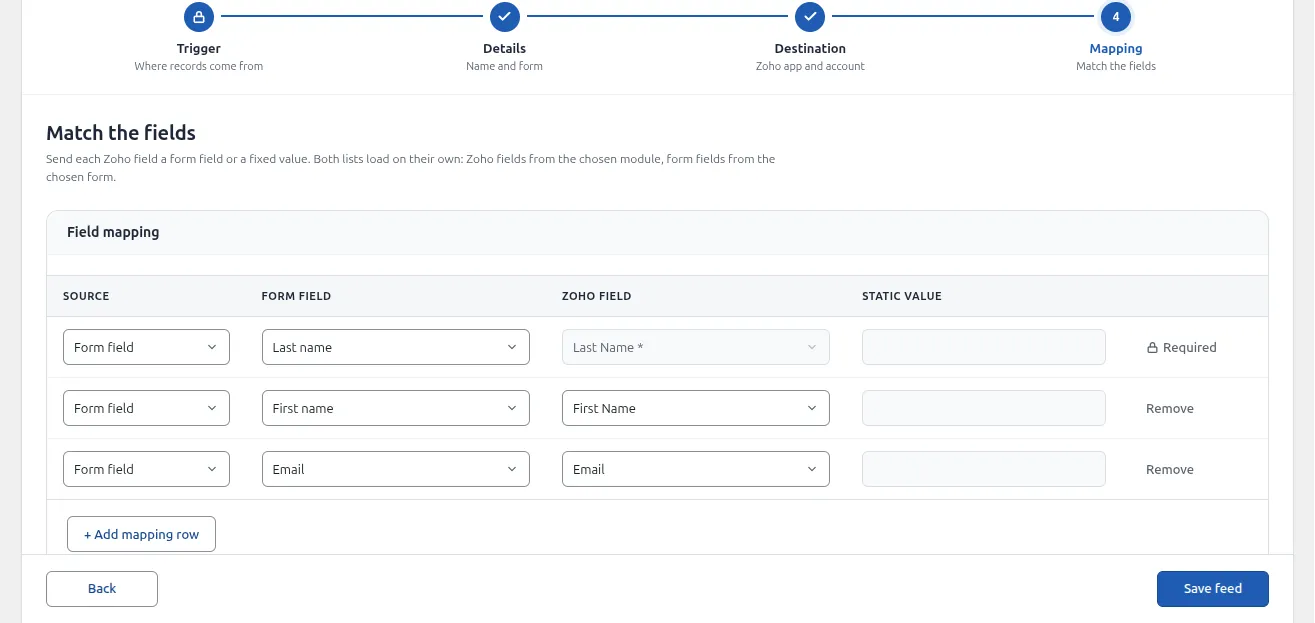
Mapping step with form fields matched to Zoho CRM fields
You'll need WordPress 6.2+ and PHP 7.4+ for the free plugin. Pro needs WordPress 6.4+ and PHP 8.1+. New to the plugin? Start with the installation and setup guide.
See FormBridge in Action
Watch a full walkthrough, from connecting Zoho to sending your first submission.
- Create and authorise a Zoho connection
- Build a feed and map your fields
- Check the result in Logs and in Zoho
Can't see the player? Watch the video on YouTube.
Free and Pro versions
Start with the free plugin. Add Pro when you need more triggers, more destinations or conditional logic. Pay monthly, yearly or once.
Free
For sending WordPress forms to Zoho
- 10 form plugins as triggers
- 6 Zoho apps, including CRM, Books and Desk
- Field mapping and duplicate handling
- Delivery logs, retries and resubmit
- Multiple Zoho accounts
Pro
For stores, memberships, bookings and custom workflows
Save 67% compared with paying monthly
$19.99 per website per year
Everything in Free, plus:
- 17 extra triggers: WooCommerce, bookings, LMS and more
- Action hooks, webhooks and Zoho Inventory
- Conditional logic and advanced Zoho CRM options
- Priority support and plugin updates
See all Pro prices
| Websites | Monthly | Annual | Lifetime |
|---|---|---|---|
| 1 website | $5/month | $19.99/year | $59.99 one-time |
| 3 websites | $6.99/month | $59.99/year | $179.99 one-time |
| 10 websites | $12.99/month | $99.99/year | $274.99 one-time |
| 30 websites | $16.99/month | $161.99/year | $489.99 one-time |
Pro is an add-on and needs the free plugin installed. If a monthly or annual licence ends, your site keeps working and saved conditional logic still applies. Pro triggers, updates and priority support stop until you renew.
Compare Free and Pro
| Feature | Free | Pro |
|---|---|---|
| Form plugins as triggers | 10 | 10 |
| Extra triggers: WooCommerce, MemberPress, LearnDash, GiveWP, booking plugins and more | Not included | 17 |
| Action hook trigger for custom code | Not included | Included |
| Zoho apps | 6 | 7, adds Zoho Inventory |
| Webhook to any URL | Not included | Included |
| Conditional logic | Not included | Included |
| Advanced Zoho CRM options: tags, record owner, workflow trigger, blueprint trigger and GCLID capture | Not included | Included |
| Field mapping, static values, combined fields | Included | Included |
| File uploads to Zoho CRM | Included | Included |
| Duplicate handling | Included | Included |
| Delivery log, retries and resubmit | Included | Included |
| Multiple Zoho accounts | Included | Included |
| Email alerts and privacy tools | Included | Included |
| Updates | From WordPress.org | With an active licence |
Help and community
Find a guide, ask other users, or email the team that builds FormBridge.
Documentation
Step-by-step guides for connections, every form plugin and every Zoho app. Read the docsFacebook community
Ask questions, share setups and get product updates from other FormBridge users. Join the groupEmail support
Stuck on a feed? Send us the feed log and a short description of the problem. support@techwavesolutions.netFrequently asked questions
Can't find your answer? Email support@techwavesolutions.net.
What does FormBridge for Zoho do?
FormBridge for Zoho sends WordPress form submissions to Zoho apps. You pick a form, choose a Zoho app and module, and map the fields. Each new submission is then sent to Zoho automatically.
Which WordPress form plugins are supported?
Elementor Pro Forms, Contact Form 7, WPForms, Fluent Forms, Forminator, Ninja Forms, Gravity Forms, Formidable Forms, Happy Forms and SureForms. All ten work in the free version.
Which Zoho apps can I send data to?
The free plugin sends data to Zoho CRM, Zoho Bigin, Zoho Books, Zoho Desk, Zoho Campaigns and Zoho Marketing Automation. Pro adds Zoho Inventory and a webhook destination for any custom URL.
Is FormBridge for Zoho free?
Yes. The free plugin includes all ten form triggers, six Zoho apps, field mapping, duplicate handling, automatic retries and delivery logs. Pro is an optional add-on.
What does the Pro version add?
Pro adds 17 more triggers, such as WooCommerce customers, MemberPress members and booking plugins, plus an action hook trigger for custom code. It also adds Zoho Inventory, a webhook destination and conditional logic. Pro needs the free plugin installed and active.
What happens if my Pro licence expires?
Your site keeps working, and conditional logic rules you already saved still apply. Pro triggers and destinations, plugin updates and priority support stop until you renew.
How do I connect my Zoho account?
Create a Server-based Application client in the Zoho API Console. Paste its Client ID and Client Secret into FormBridge under Connections, then click Connect with Zoho and accept the permissions. Read the Zoho connection guide.
What happens if a submission fails to reach Zoho?
FormBridge retries temporary errors up to three more times, after 30 seconds, 2 minutes and 8 minutes. The final result is shown in Logs, where you can resubmit failed entries if Store submitted values is turned on.
Does FormBridge store what visitors type?
Not by default. Logs record field names only, unless you turn on Store submitted values in Settings. The plugin also works with the WordPress personal data export and erase tools.
How much does FormBridge Pro cost?
Pro for one website costs $5 per month, $19.99 per year or $59.99 once for a lifetime licence. Plans are available for 1, 3, 10 or 30 websites on every billing cycle, and the full price list is on the pricing table. View Pro plans.
Where can I get help?
Read the documentation, watch the YouTube tutorials, join the Facebook community, or email support@techwavesolutions.net.
Is FormBridge an official Zoho product?
No. FormBridge for Zoho is an independent plugin built by Techwave Solutions. It is not affiliated with or endorsed by Zoho Corporation.
Ready to Connect Your Forms to Zoho?
Install the free plugin, connect your Zoho account and send your first submission today.
FormBridge for Zoho is built by Techwave Solutions and is not affiliated with or endorsed by Zoho Corporation.